Xero Tip of the Month: The Refreshed Xero Accounting App Navigation

July 3, 2026

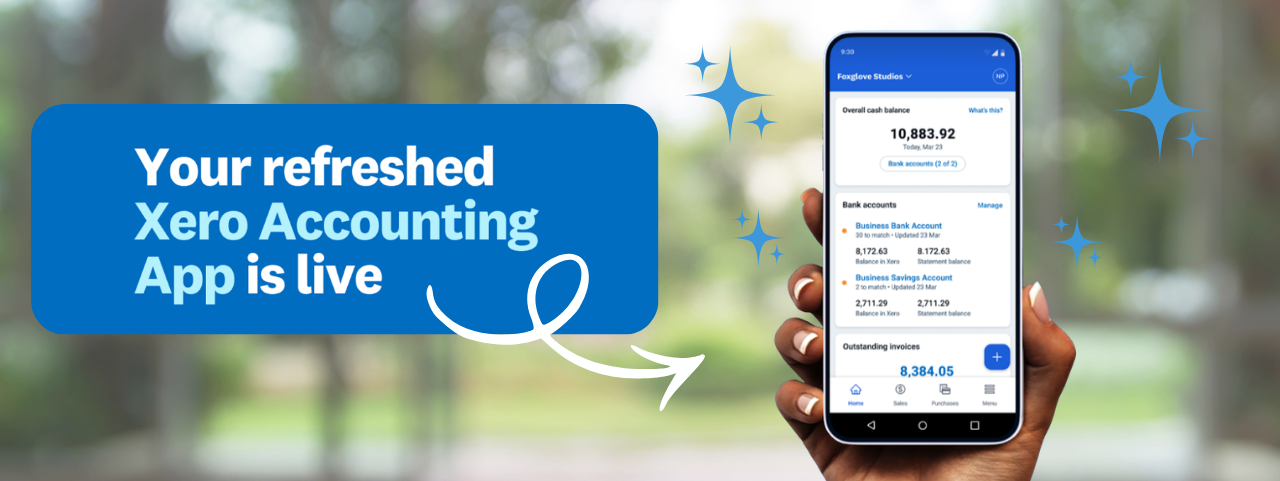
Keeping on top of your school finances while you’re out and about just got easier! Xero has refreshed the Accounting App experience to make it simpler for you to access key features and complete everyday tasks from your mobile device.


The updated layout improves how you move between core areas, helping you find what you need faster and stay on top of activity wherever you are.


What’s Changed - The key improvements include:

  • A simplified bottom navigation to help you move between key areas more easily
  • Home as the main dashboard view for a clearer overview experience
  • Key functions such as invoices, bills, bank accounts, and contacts accessed through a streamlined Menu for easier navigation


This makes it easier for you to quickly locate what you need, whether you’re processing invoices, reviewing transactions, or checking account activity.


How to Use the Refreshed App Navigation:

  • Open the Xero Accounting App on your mobile device
  • Use the simplified bottom navigation to move between key areas
  • Tap Home to view your account overview
  • Access core functions such as invoices, bills, bank accounts, and contacts via the Menu
  • Navigate directly through the Menu rather than switching between multiple screens or tabs


Next time you’re using the Xero mobile app, take a moment to explore the updated layout, it’s designed to help you move through tasks more efficiently, wherever you’re working from. 

By Ben Duflou July 3, 2026
For schools, term breaks can place pressure on day-to-day cash flow. Income from fees and other funding may slow or pause during these periods, while key commitments continue such as staff salaries, utilities, maintenance, and supplier payments. This timing difference between income and expenditure can create short-term cash flow gaps, even in well-managed schools. With a bit of forward planning, these can be managed smoothly. The good news is that with simple preparation and regular monitoring, schools can move through term breaks with confidence and maintain financial stability throughout the year. Tips to Keep Cash Flow Healthy 1. Forecast the break early: Start by building a simple cash flow view for the break period. Include: Expected income (fees, grants, or funding payments) Regular costs (payroll, utilities, insurance) Any planned one-off spend (repairs, projects, maintenance) This helps you see any pressure points early, so you can plan ahead rather than react later. 2. Bring forward income where possible: If timing allows, try to bring some income forward before the break. For example: Encourage early payment of school fees where appropriate Submit funding claims or reimbursements ahead of deadlines Invoice any outstanding sundry charges before term ends Even small timing changes can help improve cash flow during quieter periods. 3. Review and pause non-essential spend: Term breaks are a good time to review upcoming payments. Ask: Does this need to be paid now, or can it wait until next term? Can any subscriptions, services, or projects be paused or delayed? Can supplier payments be timed more evenly? Small adjustments can ease pressure on available funds. 4. Plan payroll carefully: Payroll is usually the largest and most consistent cost for schools. Before the break: Check payroll dates line up with available cash Review any casual or overtime costs Make sure holiday pay and leave entitlements are accounted for This helps avoid surprises during the break period. 5. Keep a simple weekly cash check: Cash flow can still move during term breaks, even if things feel quieter. A quick weekly check of: Bank balance Upcoming payments Expected income can help you stay ahead of any issues early. 6. Stay close to your finance and accounting support team (that's us!): Term breaks are often when small issues can build if they’re not picked up early. At AFS, we help schools regularly review their cash flow position, check forecasts, and make sure funding and payroll cycles are aligned going into holiday periods. Final thoughts Term breaks don’t need to create financial stress. With simple planning and regular monitoring, schools can stay in control of cash flow and start the next term in a strong position. If you’d like support reviewing your cash flow ahead of an upcoming break, the AFS team is here to help.
By Ben Duflou July 3, 2026
View our Chalkboard - July 2026: - 2026 Government Budget Announcement - 2025 Annual Accounts - ApprovalMax Subscription Fee Increase - Important Notices - Xero Tip of the Month: The Refreshed Xero Accounting App Navigation - Welcome to the Team: Lavina - How to Manage Cash Flow During Term Breaks - Looking ahead https://public2.bomamarketing.com/email/ezQb

By Ben Duflou June 19, 2026
During winter, schools face the challenge of maintaining comfortable indoor temperatures while still ensuring good ventilation in classrooms. Good airflow continues to play an important role in reducing the spread of illness and supporting student wellbeing and concentration. Even in colder months, effective ventilation can still be achieved by briefly opening windows between lessons, or using CO₂ monitors to help guide airflow decisions while maintaining warmth. The key is finding the right balance between retaining heat and maintaining good air quality throughout the winter term. For further guidance, see the Ministry of Education’s advice on ventilation in school buildings: https://www.education.govt.nz/.../ventilation-school...
By Ben Duflou June 5, 2026
Expanding a school or launching new programmes is an exciting step, but it also brings financial challenges that require careful planning. Strong financial planning helps ensure growth is sustainable, risks are managed, and resources are allocated effectively. To support successful growth, schools should have a clear financial framework in place before committing to any major expansion decisions. This provides a strong foundation for decision-making, helping leaders assess whether plans are affordable and aligned with long-term financial priorities. The following steps outline how schools can approach effective financial planning. Steps for Effective Financial Planning: Define the Scope and Objectives: Clearly outline the goals of the expansion or new programme, including expected costs, required resources, and anticipated benefits . Develop a Detailed Budget: Estimate all costs, including staffing, facilities, equipment, technology, and ongoing operational expenses. Include contingency funding for unexpected costs. Forecast Cash Flow: Consider how income (such as fees, grants, or donations) will align with expenditure, ensuring sufficient liquidity throughout each stage of the project. Assess Funding Options: Explore funding sources such as school reserves, government grants, sponsorships, or loans, and ensure these align with the school’s overall financial strategy. Evaluate Financial Risk: Identify potential risks, such as lower-than-expected enrolment or increased costs, and plan appropriate mitigation strategies. Monitor and Review: Regularly track spending against the budget and adjust plans where needed to stay on course. The Benefits of Planning Thorough financial planning helps schools expand responsibly, avoid cash flow pressures, and ensure new programmes are sustainable and successful. It also provides transparency and confidence for trustees, staff, and the wider school community. At Accounting for Schools, we support schools with practical financial planning guidance to help make expansion and new programme decisions well-informed and sustainable. If your school is considering growth or new initiatives, please feel free to get in touch with our team.
By Ben Duflou June 5, 2026
Tracking categories are a powerful tool in Xero for schools, but they only deliver meaningful and accurate reporting when used consistently. As schools evolve throughout the year, tracking setups can quickly become outdated if they are not regularly reviewed. To ensure your reporting remains accurate and useful, we recommend periodically reviewing your tracking setup to confirm: New funding streams are being captured correctly Existing departments or activity categories are still relevant Reporting continues to align with Board and management requirements Regular maintenance of your tracking categories helps ensure your reporting remains consistent and reliable for Board reporting and decision-making. If you would like a refresher on setup, you can refer to our September 2022 Xero Tip - How To Use Tracking Effectively.
June 5, 2026
View our Chalkboard - May 2026: - 2025 Annual Accounts - The Final Stretch - Important Notices - Xero Tip of the Month: Keep Your Tracking Categories up to Date for More Accurate Reporting - Welcome to the Team: Abel - Financial Planning for School Expansion or New Programmes - Looking ahead https://public2.bomamarketing.com/email/gAy6 
By Ben Duflou May 22, 2026
As winter approaches, schools often experience increased pressure on operational budgets, particularly around building maintenance and energy use. Heating is one of those areas that can quietly increase costs if systems aren’t running efficiently. When heat pumps haven’t been regularly serviced, schools may experience reduced performance, higher running costs, and avoidable breakdowns during the colder months. Taking a preventative approach now can help reduce the risk of unexpected expenditure and support smoother day-to-day operations throughout the winter term. A little planning ahead can go a long way during the winter months If you’d like to review operational costs or talk more about winter-related expenditure, our team is here to help.
By Ben Duflou April 29, 2026
Fundraising plays a vital role in supporting school communities, funding extracurricular activities, resources, and special projects that fall outside core curriculum delivery. However, without clear tracking and reporting processes, it can quickly become difficult to maintain accuracy and transparency in financial reporting. Establishing a structured approach helps schools maintain trust with their community and ensures fundraising income is accurately reflected in financial statements. Best Practices for Tracking Fundraising Income Separate Fundraising from Other Income Streams: Create distinct codes or categories within your accounting system (such as Xero) for each fundraising activity. This helps ensure income and related expenses are clearly matched. Record Income at Source Level: Where possible, track income by event or campaign (e.g. gala, sausage sizzle, online donation drive). This allows schools to assess which activities are most effective. Match Expenses to Fundraising Activities: Include all related costs such as venue hire, materials, or promotional expenses. This provides a true picture of net fundraising performance. Use Consistent Naming Conventions: Standardise naming across all entries (e.g. “2026 PTA Gala” rather than variations like “Gala Night” or “School Gala”). Consistency improves reporting accuracy and reduces errors. Reconcile Regularly: Reconcile fundraising accounts monthly to ensure all income has been received and correctly allocated. This is especially important during busy event periods. Track Online and Cash Donations Separately: Different payment channels require different reconciliation processes. Ensure online platforms, cash collections, and bank transfers are all individually tracked. Reporting Fundraising Results Effectively Clear reporting is just as important as accurate tracking. Schools should aim to provide: Summary reports per campaign (income, expenses, and net result) Year-to-date fundraising totals Comparisons against previous years or targets Breakdown by fundraising type This level of reporting supports better decision-making and helps school leadership understand the true impact of fundraising efforts. How Accounting for Schools Can Help At Accounting for Schools, we can help you build robust financial systems and structured reporting frameworks that make fundraising tracking and reporting simple, accurate, and transparent. With the right systems in place, you’ll gain greater visibility over what’s working, where improvements can be made, and how your fundraising efforts are contributing to your school’s broader goals.
April 29, 2026
Say goodbye to tab-jumping and constant back-button clicking. Xero’s Quick View panel is here to make bill management significantly faster. With split-screen editing, you can now review, edit, and approve bills without ever losing sight of your main list. How to Use Quick View for Bills: 1. Under Purchases, select Bills 2. Click the View (eye) icon next to any bill to slide open the split-screen panel. 3. Within the Quick View panel, you can: Approve bills quickly with Approve & Next or arrow buttons Edit bill details and line items instantly Check attachments - View the source invoice alongside the data entry. Update supplier info or adjust payment dates Resize the panel or show/hide columns to suit your workflow Next time you’re working through your payables, use Quick View to speed up your workflow and complete your bill processing in record time. 
Show More